👋 Hi there! I'm Suzie, a developer who began my coding journey in 2023. I’m passionate about building fast and dynamic web experiences using Next.js, JavaScript, and Tailwind CSS.
🌱 As I grow in tech, I enjoy documenting my learning journey and sharing insights to help others navigate their path.
✨ Fun fact: When I’m not coding, you can find me practicing Capoeria 🤸.
Let’s connect, learn, and create together!
space-x-2 is a Tailwind CSS utility class (predefined small-scale classes) used to add horizontal spacing (gap) between sibling elements(elements that share the same parent element) inside a container.
Definition
space-x-2adds horizontal spacing bewteen direct child elements.the
2refers to a predefined spacing value in Tailwind’s spacing scale, which by default equals0.5rem (8px).
How it works
This class only applies spacing between child elements.
It uses the
margin-leftormargin-rightproperty under the hood to create gaps between the items.
Example Code
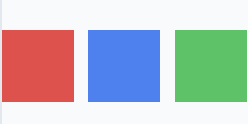
 <div class="flex space-x-2">
   <div class="bg-red-500 h-10 w-10"></div>
   <div class="bg-blue-500 h-10 w-10"></div>
   <div class="bg-green-500 h-10 w-10"></div>
 </div>
The container uses a
flexlayout.The
space-x-2class adds 8px of horizontal spacing between each child (div).
Tailwind’s default spacing scale
- The numbers in
space-x-Ncorrespond to Tailwind’s spacing scale. Here’s an overview
- The numbers in
| Class | Spacing Value |
space-x-0 | 0rem (0px) |
space-x-1 | 0.25rem (4px) |
space-x-2 | 0.5rem (8px) |
space-x-3 | 0.75rem (12px) |
space-x-4 | 1rem (16px) |
| … | … |
💬 I think it is very similar to
gapproperty. it is very useful for adding space between elemenets.
[Tailwind-website-space-x-N](https://tailwindcss.com/docs/space)

![[TypeScript] Understanding Generic Functions](https://cdn.hashnode.com/res/hashnode/image/stock/unsplash/NH0pmKaZeuk/upload/47eb76a03d44ea841c42f406a93de157.jpeg)
