How to use Git and Github

👋 Hi there! I'm Suzie, a developer who began my coding journey in 2023. I’m passionate about building fast and dynamic web experiences using Next.js, JavaScript, and Tailwind CSS.
🌱 As I grow in tech, I enjoy documenting my learning journey and sharing insights to help others navigate their path.
✨ Fun fact: When I’m not coding, you can find me practicing Capoeria 🤸.
Let’s connect, learn, and create together!
git clone
- Github에서 clone을 복사한다.
- code클릭 후 주소 복사 가능.
Terminal 실행 후,
cd desktop/foldertype 후 clone을 원하는 folder를 찾아준다.원하는 위치에서
git clone (paste the address got from 1)type해준다.- terminal에 folder 이름을 type + enter 후 `ls'를 입력하면 현재 folder에 잘 clone되었는지 확인 가능하다.
git branch & git checkout
branch를 만들어 준다. - type `git branch feature/yourname' (branch이름은 자기 마음대로)
- 만들어 준 후,
git branch를 입력후 엔터 해주면 branch가 잘 만들어 졌는지 확인 가능하다. 아래의 화면과 같이 나오면cq를 눌러 뒤로가기 가능.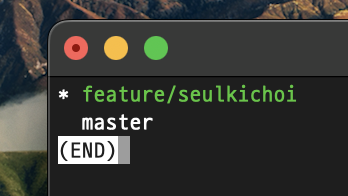
- 만들어 준 후,
branch를 만들어주었으면 branch로 접속해 보자.
git branch feature/yourname을 입력하여 접속 후git branch를 다시 입력 엔터 하여 잘 들어왔는지 확인 해 본다.- branch 바로 생성 후,
git branch접속을 하면 master가 초록색으로 보일 것이다. 그 후, 다시git branch feature/yourname으로 접속 해 준 후, 확인 해 보면 branch가 초록색을 된 것이 보일 것이다. 이 뜻은 branch 로 접속 했다는 의미!
git status & git add
6.이제 IDE(i.e. vscode)로 접속, git에서 clone해 온 folder를 열어준다.
- IDE terminal을 실행 해준다.
- 원하는 file을 add 또는 수정 후,
git add .의 명령어를 입력 후 엔터. git status입력 엔터 하여 file이 commit할 준비가 되었는지 확인 (초록색 글씨가 뜨면 됨)
git commit
git commit입력 엔터 후 변경내용 저장(I + '검색내용typing' + esc + :wq)git log를 입력 엔터 해서 잘 저장 되었는지 확인 가능 (cq로 뒤로가기 가능)
git push
- terminal에
git push origin feature/yourname입력
pull request
- 터미널 remote에 주소를
cmd키와 함께 눌러주어 PR진행
git branch -D [branch name]
-> 브랜치를 삭제해준다
git fetch [the name of the file which needs to be pulled]
-> 받고싶은 파일을 새로운 branch에 가지고 온다 :: 가져온 후, 이름을 지정해줘야함(FETCH_HEAD)
React에서 gitignore 안에 있는 파일을 지우지 않도록 조심해야한다. 아무리 branch를 옮겨도 gitignore에 있는 파일을 삭제하면 모든 공간에서 삭제되어버린다
#3. Initializing a repository 새 저장소(repository) 를 만들고 Git으로 프로젝트 관리를 시작하려면 터미널에서 프로젝트 폴더로 이동 후 다음 명령어를 입력해주세요.
git init
이 명령어는 프로젝트 폴더 내에 숨겨진 .git 디렉토리를 생성합니다. 이제 Git은 현재 저장소에 대한 모든 변경사항을 추적/관리하게 됩니다.
npx create react app으로 설치한 경우
git init생략 가능하다.
$ git remote add origin (원격저장소 github URL)
Master에서 Main 으로 이름 변경하기
$ git branch -M main
$ git push origin main

![[TypeScript] Understanding Generic Functions](https://cdn.hashnode.com/res/hashnode/image/stock/unsplash/NH0pmKaZeuk/upload/47eb76a03d44ea841c42f406a93de157.jpeg)
